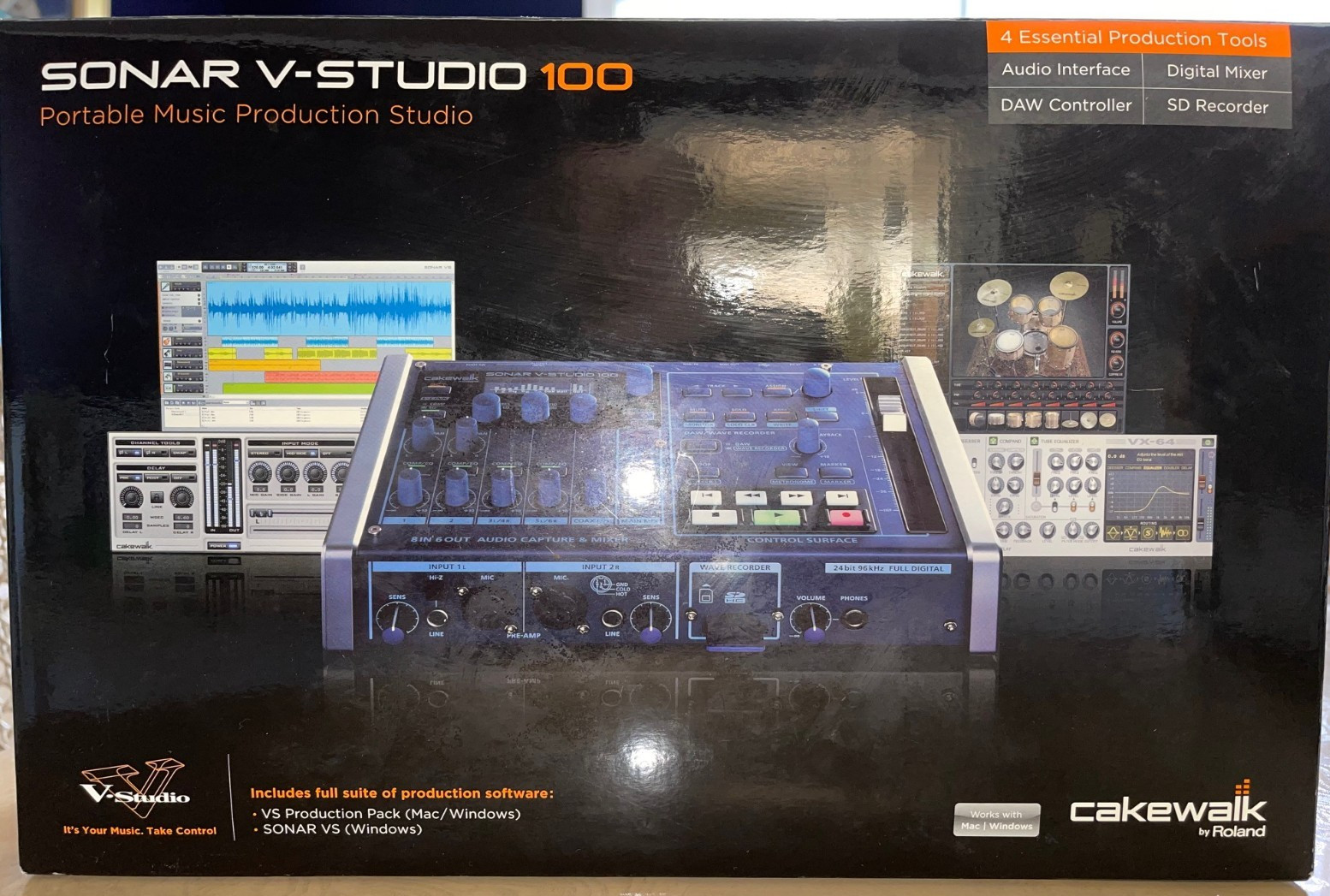

Photos from current listings. Actual item, color, and included accessories may vary.
Roland Sonar V Studio 100 Buying Guide
The Roland Sonar V Studio 100 is a legacy USB audio interface and production bundle from the Cakewalk/Roland era, built around a single portable desktop unit with mic/instrument inputs and Sonar software integration. The key trade-off is platform compatibility: it uses older USB audio drivers and bundled software that may not run natively on current operating systems, so buyers must separate working hardware from obsolete software. The decision rule is simple: buy only if you have a legacy Windows machine or confirmed driver path, and skip if you need plug-and-play class-compliant operation on modern macOS or Windows 11.


At a glance
- Brand
- Not synced yet
- Model
- Not synced yet
- MPN
- Not synced yet
- Category
- Recording & Studio Gear
- Status
- Offers available
- Data updated
- Nov 15, 2026
Current offers
Highlights
- USB audio interface architecture with dedicated mic preamp and instrument input, not a class-compliant plug-and-play device on modern OSes.
- Bundled Cakewalk Sonar software is tied to legacy licensing and OS versions; the hardware can outlive the software license.
- Driver support is the gating factor: Roland/Cakewalk USB audio drivers target older Windows releases, not current macOS or Windows 11.
- I/O tier is entry-level desktop: typically one or two analog inputs with phantom power, stereo output, and headphone monitoring.
Best use cases
- Best fit: a hobbyist with an older Windows 7/8/10 machine who wants a compact Roland-branded interface and can source legacy drivers.
- Best fit: a collector or Sonar/Cakewalk legacy user restoring a period-correct small studio setup.
- Wrong fit: a modern Mac user expecting class-compliant Core Audio operation without vendor drivers.
- Wrong fit: anyone needing multi-channel recording, low-latency Thunderbolt, or current-gen driver support for Windows 11.
Buying tips
- Confirm the unit includes its original USB cable and any bundled software discs or license codes; the software is often the harder part to replace.
- Check the OS ceiling before buying: legacy Roland/Cakewalk drivers typically cap out at older Windows versions and do not support Apple Silicon.
- Verify phantom power (+48V) is present if you plan to use condenser microphones; entry interfaces sometimes omit it.
- Prefer units sold as tested/working with a return path, since driver and software issues are hard to diagnose from a listing alone.
Specs
| Interface Type | USB desktop audio interface |
|---|---|
| Driver Support | Legacy Roland/Cakewalk only |
| Input Tier | 1-2 analog (mic/instrument) |
| Bundled Software | Cakewalk Sonar (legacy license) |
Alternatives to compare


Related searches
What to check before buying
- Match the interface to your computer: confirm your OS version falls within the legacy driver support window before committing.
- Verify the input count you need: one mic plus one instrument is the likely ceiling, so multi-source sessions will need more inputs.
- Check monitoring: confirm stereo line outputs and a headphone jack match your speakers and headphones.
- Confirm the software situation: decide whether you will use the bundled Sonar or a modern DAW, since the bundle may not activate.
FAQ
Data sources: eBay / Amazon listings and product attribute feeds Data updated Nov 15, 2026.
Some links on this page are affiliate links. If you buy after clicking one, we may earn a commission at no extra cost to you. This does not change which products appear here or their order. Affiliate disclosure.