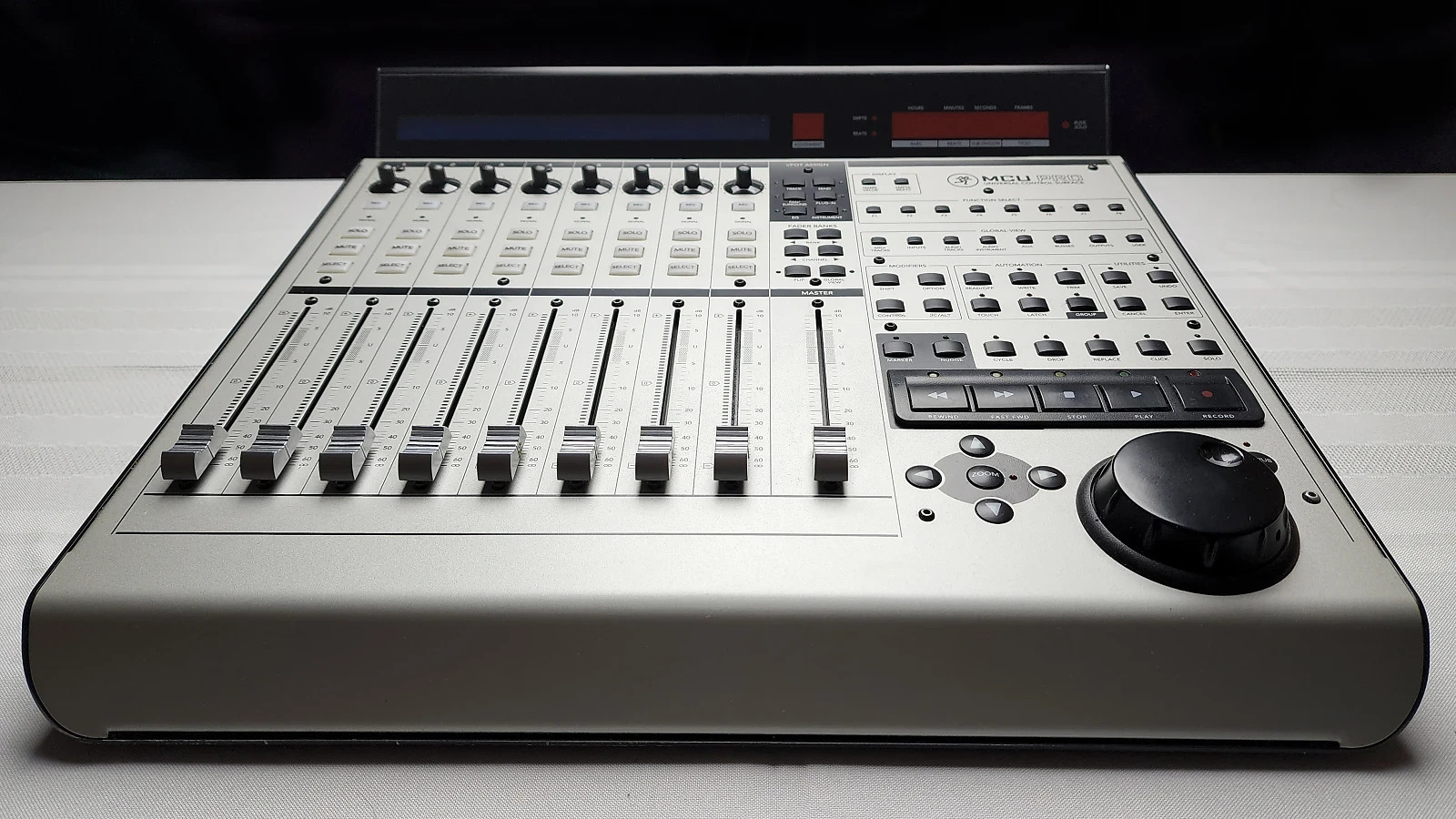

Photos from current listings. Actual item, color, and included accessories may vary.
Mackie MCU Pro Buying Guide
The Mackie MCU Pro is a professional USB/MIDI control surface that emulates a full mixing console for DAW software, using motorized faders and touch-sensitive encoders for tactile control. The core trade-off is between proven Mackie control protocol compatibility with major DAWs versus the aging USB 1.1 interface and lack of modern high-resolution displays. Choose the MCU Pro for its eight motorized Penny+Giles faders and Mackie Control Mode; skip it if you need USB-C, Ethernet, or high-resolution metering.


At a glance
- Brand
- Not synced yet
- Model
- Not synced yet
- MPN
- Not synced yet
- Category
- Recording & Studio Gear
- Status
- Offers available
- Data updated
- Nov 15, 2026
Current offers
Highlights
- Eight 100mm motorized Penny+Giles touch-sensitive faders with 10-bit resolution and Mackie Control protocol emulation
- USB 1.1 MIDI interface and dual MIDI I/O ports for expander units; no USB-C or Ethernet connectivity
- Backlit LCD displays with 2x55-character text and dedicated transport, navigation, and encoder assignment buttons
- Expandable via Mackie Control Extender units for up to 32 fader channels; requires external MIDI interface for expansion
Best use cases
- Best fit: project and professional studios using Logic Pro, Pro Tools, Cubase, or Ableton Live that need tactile fader control for mixing and automation.
- Best fit: users who already own a Mackie Control Extender or plan to add one for 16+ channel mixing via MIDI daisy-chaining.
- Wrong fit: mobile or laptop-based producers needing bus-powered USB-C controllers; choose a modern USB-C control surface instead.
Buying tips
- Confirm your DAW supports Mackie Control protocol natively (Logic Pro, Pro Tools, Cubase, Nuendo, Ableton Live) or via a script; unsupported DAWs require manual MIDI mapping.
- Plan for a powered USB hub if daisy-chaining an Extender, since the MCU Pro's USB 1.1 port provides limited bus power.
- Check that your computer has USB-A ports or a reliable USB-A to USB-B cable; the MCU Pro does not include a USB-C cable.
- For expansion, budget for a MIDI interface or use the MCU Pro's MIDI Thru port to connect an Extender, as the USB port supports only one device directly.
Specs
| Fader Type | 8x 100mm motorized touch-sensitive |
|---|---|
| Connectivity | USB 1.1 Type-B + 2x MIDI I/O |
| Protocol | Mackie Control / HUI emulation |
| Expansion | Up to 4 Extenders via MIDI Thru |
Alternatives to compare



Related searches
What to check before buying
- Measure desk depth: the MCU Pro is approximately 20 inches deep and 19 inches wide; ensure at least 24 inches of desk depth for cables and monitor placement.
- Verify your DAW version and OS compatibility: Mackie Control supports macOS 10.12+ and Windows 10+ via class-compliant MIDI, but older versions may need drivers.
- Confirm power: the MCU Pro uses an external 12V DC power supply (included); ensure a nearby outlet or UPS for studio reliability.
- Check MIDI expansion needs: if adding an Extender, you need a free MIDI port or a MIDI Thru box, plus a second power outlet.
FAQ
Data sources: eBay / Amazon listings and product attribute feeds Data updated Nov 15, 2026.
Some links on this page are affiliate links. If you buy after clicking one, we may earn a commission at no extra cost to you. This does not change which products appear here or their order. Affiliate disclosure.